Drapewright Open the studio

Free sewing pattern software, in your browser

See how your sewing pattern fits before you cut

Drapewright opens the patterns you already have, fits them to your measurements, sews them up on a 3D body in your fabric, and prints or projects them at true size. It is free, needs no account, and keeps your patterns on your own device.

Open Drapewright: free, no sign-up Try it on a sample blouse

Made first for the iPad at the sewing table; works in Safari, Chrome, Edge and Firefox on any computer, and offline once opened.

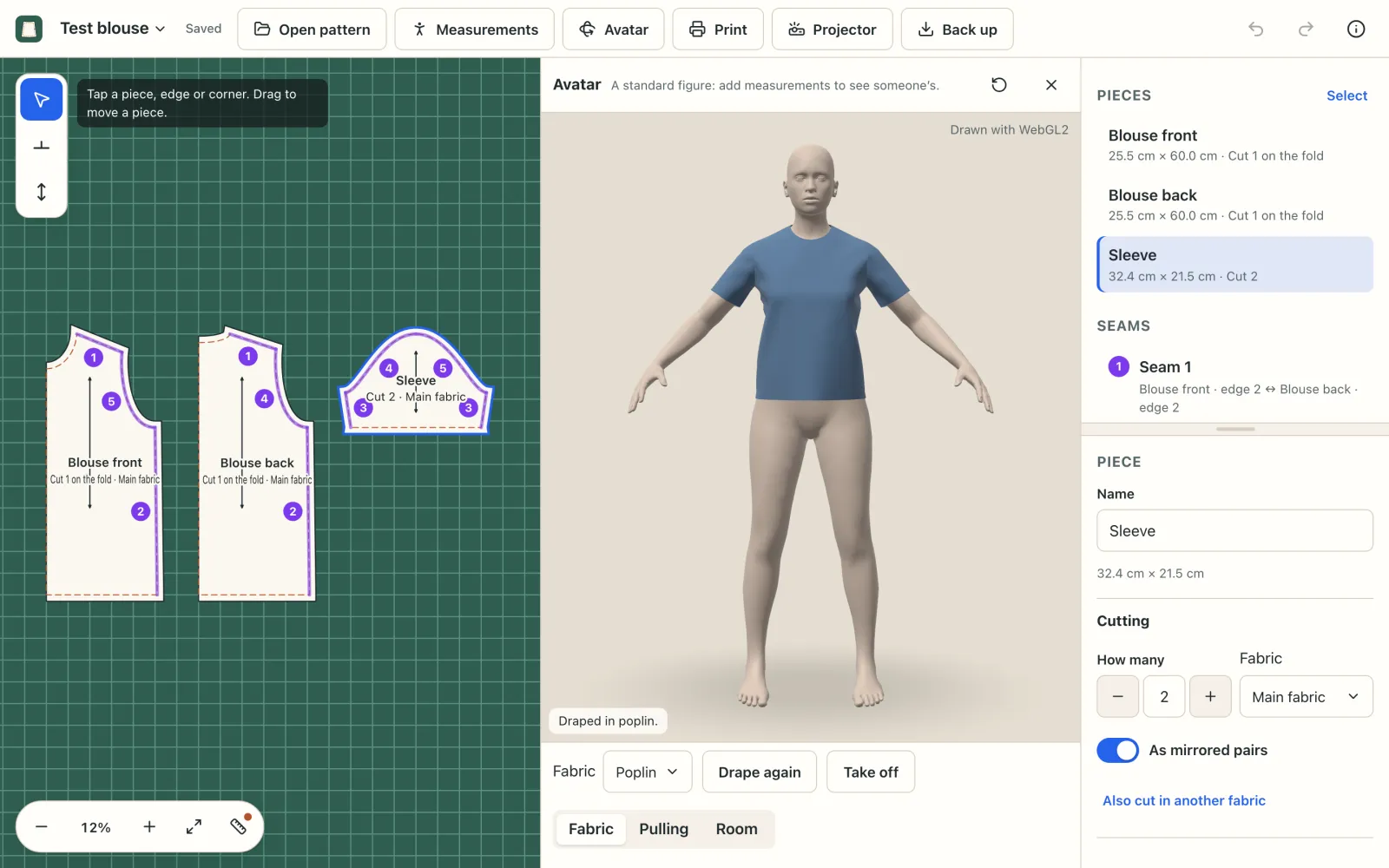
A blouse pattern sewn up and draped on a 3D figure in Drapewright, the pattern pieces on a green cutting table beside it.

A pattern studio for people who sew

Garment design software is made for fashion studios: costly, built for a desk and a mouse, and slow to learn. Drapewright is for working with real sewing patterns, by touch, Pencil or mouse.

  • Open the PDF patterns you already own

    Tiled A4 and US Letter or A0 copy-shop PDFs, with the pages put back together, the instruction pages left out, and every size of a multi-size pattern kept apart. SVG from Inkscape or FreeSewing, and DXF from garment CAD (tested with exports from Gerber, Lectra, Assyst, CLO and Browzwear). A paper pattern can be photographed beside a sheet of printer paper and brought in at its true size.

  • Seam allowance, notches and cutting

    Seam and hem allowance with properly shaped corners, notches, grainlines, and how many to cut of each piece, in which fabric, as mirrored pairs or on the fold.

  • Fit it to your measurements in 3D

    Enter measurements and the figure takes your shape. Drapewright finds which edges are sewn together, sews the garment and drapes it, linings inside: see where it pulls and where there is room, in poplin, jersey, denim or a fabric you measured at home, standing, walking, sitting or reaching.

  • Full bust, swayback and other alterations

    Lengthen or shorten, full or small bust adjustment, swayback, shoulders, waist and hip, moving a dart, truing an edge. Each is a step you can switch off, and the drape follows.

  • Print at true scale, or project onto your mat

    Tiled PDFs on A4 or Letter with a test square, or A0 for the copy shop. Or use a sewing projector: the pieces go on your cutting mat at true size, calibrated to the millimetre.

  • Made for iPad, works offline

    Touch and Apple Pencil first. No account, no adverts, no tracking: Drapewright runs in the browser, works offline, and never sends your patterns anywhere. Backups are files you keep.

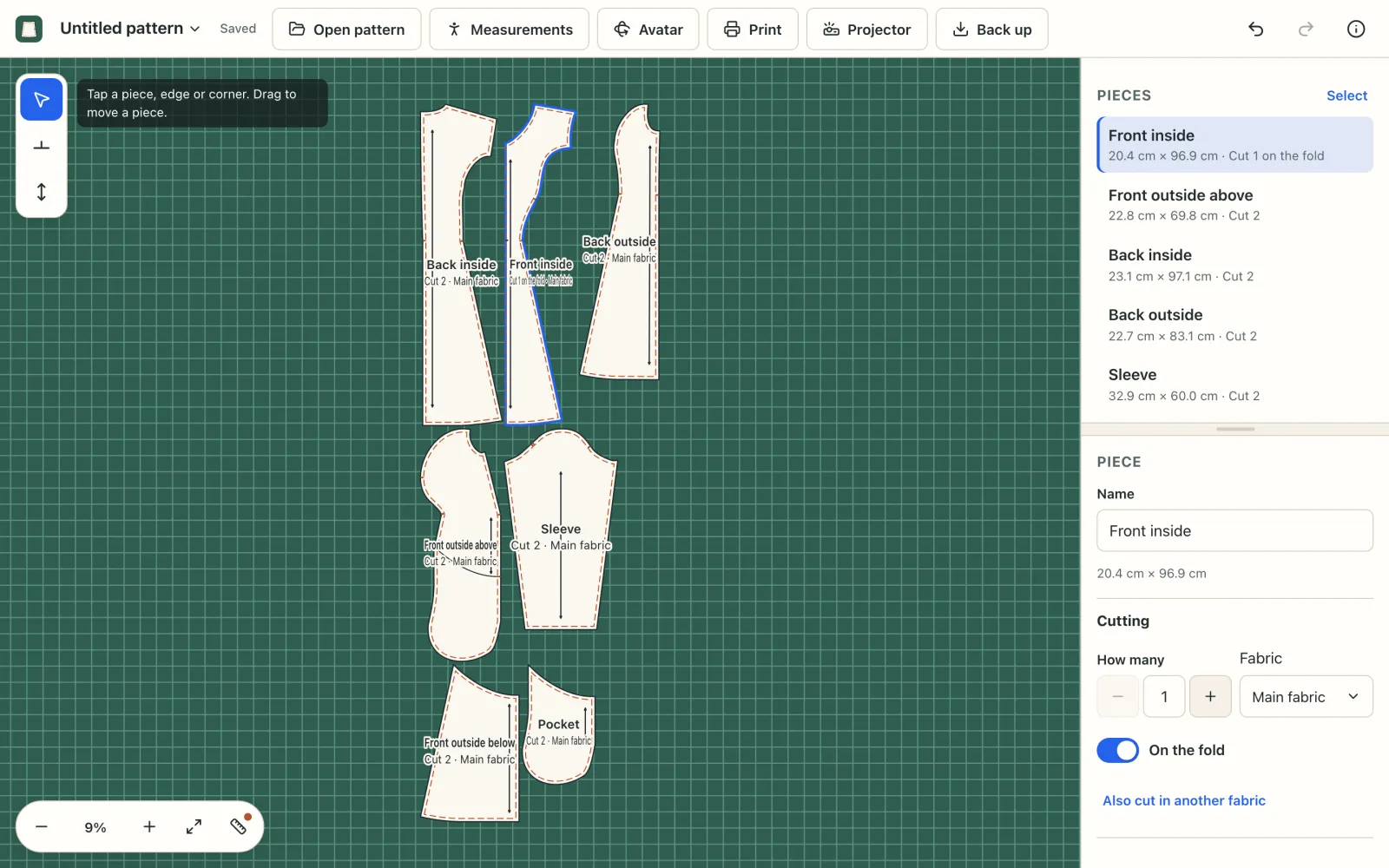
A FreeSewing dress pattern opened from a PDF on Drapewright's cutting table, with its pieces listed and the chosen piece's details beside them.
A FreeSewing dress, opened from its PDF: every piece named, with its grainline, notches and seam allowance.

Why we started

Drapewright began at home. My wife sews, from patterns bought as PDFs, on an iPad at the sewing table. A pattern means printing and taping pages, finding the right size, and hoping it fits before cutting into good fabric. The software that shows a garment on a body before you cut does exist, but it is made for fashion studios, priced for them, and needs a desk, a mouse and months of learning.

So I started building the tool I wished my wife had: one that opens the patterns we already buy, works by touch and Pencil, shows how a pattern will hang on a body with my wife’s measurements, and costs nothing. My wife tests every step and tells me where it’s wrong. Most of what Drapewright knows about sewing comes from those conversations.

JP, who writes the code

Free, and given back

  • Free to use. No account, no trial, no paid tier holding the useful parts back.
  • Built on open work. The 3D figure is made from MakeHuman’s public-domain body data, prepared as NAVER’s Anny project does, and Drapewright reads FreeSewing’s open patterns as they are published.
  • Open file format. A Drapewright project is a zip of plain JSON with a published schema, so your work is never locked in.
  • Open source, soon. We are preparing the code to be opened, so anyone can learn from it, fix it and build on it.

What we’re building

The aim: anyone who sews can see a pattern on a body like theirs, in their fabric, and change it until it fits, before a single cut. What’s next:

  • Corsets that draw the waist in, and backs that lace.
  • A faster drape on the iPad, using its graphics chip (WebGPU).
  • More pattern files read cleanly, as people send us the ones that aren’t.

Help us grow it

Drapewright is young, and it gets better every time someone tries it on their own patterns. We’d love to hear from you if you:

  • sew, and have a pattern that won’t open, or a drape that looks wrong;
  • make or sell patterns, and know what would make this useful for your work;
  • write code (Rust, TypeScript, WebAssembly, cloth simulation), design, test or translate, and want to help build it.

Email JP JP on LinkedIn

Or write to juan.bothma@gmail.com.

Questions

Is there a free alternative to CLO 3D for home sewing?

Drapewright is one, for checking the fit of sewing patterns. Like CLO 3D and Marvelous Designer, it sews pattern pieces together and drapes them on a 3D figure, so you can see where a garment pulls before you cut. Unlike them, it is free, runs in the browser and on an iPad, and starts from the patterns you already own (PDF, SVG or DXF). It is built for home sewing, not as a fashion design suite: it doesn’t render fabrics for catalogues or design garments from scratch in 3D.

Can I use it on an iPad?

Yes, it was made for one: touch and Apple Pencil, in Safari. Add it to your Home Screen and it opens like an app, and it works offline. It also works in Chrome, Edge, Safari and Firefox on a Mac, Windows or Linux computer.

Will it open my PDF patterns, on A4, US Letter or A0?

Yes: tiled A4 and US Letter PDFs, with the pages put back together, and A0 copy-shop files, including patterns with many sizes drawn in colours or layers. It also opens SVG files (from Inkscape, FreeSewing and others) and DXF files from garment CAD (AAMA/ASTM, tested with exports from Gerber, Lectra, Assyst, CLO and Browzwear). PDFs that need a password to open can’t be read.

Can I print an A0 pattern at home?

Yes. Open the A0 file and print it tiled on A4 or Letter pages, with a test square to check the scale and marks to line the pages up. Or the other way round: a pattern tiled on many pages can be printed on one A0 sheet at a copy shop.

Does it work with a sewing projector?

Yes. Projector mode shows the pieces you choose on your cutting mat at true size, once you have measured the projector’s rectangle on the mat. No need to stitch PDF pages together first.

Does it add seam allowance?

Yes, for the whole piece or edge by edge, with the corners shaped as they should be (folded back at a hem, pointed or squared elsewhere). If the pattern already includes its allowance, Drapewright keeps the cutting line as printed and shows the stitching line inside it.

Can I see the fit before cutting fabric?

Enter your measurements and the 3D figure takes your shape. Press Find seams and Drapewright suggests which edges are sewn together; sew them, open the avatar and press Drape. You see where the garment pulls and where it has room, in the fabric you choose, and every alteration you make shows on the figure. It tells you a lot before you cut, but it doesn’t replace a toile for a close fit.

Can it do a full bust adjustment and other alterations?

Yes: full or small bust adjustment, lengthen or shorten, swayback, broad or narrow shoulders, waist and hip, pivoting a dart, and truing an edge. Each is a step you can switch on and off.

Do I need an account, and where are my files kept?

No account. Everything happens in your browser, and your projects are kept on your device; nothing you open is sent to us or to anyone else. Back up a project as a file whenever you like.

Can I draft a pattern from scratch?

That isn’t what Drapewright is for yet. Patterns drafted elsewhere open in it if the program saves them as SVG, DXF or PDF.

What does it cost? Is it open source?

Nothing, and there is no paid tier. We are preparing the code to be opened as open source.